Words of Wonders: Hexa
- 4.9
- Rating
- 50.00K
- Installs
- Free
- Price

 Analysis by App-foxy
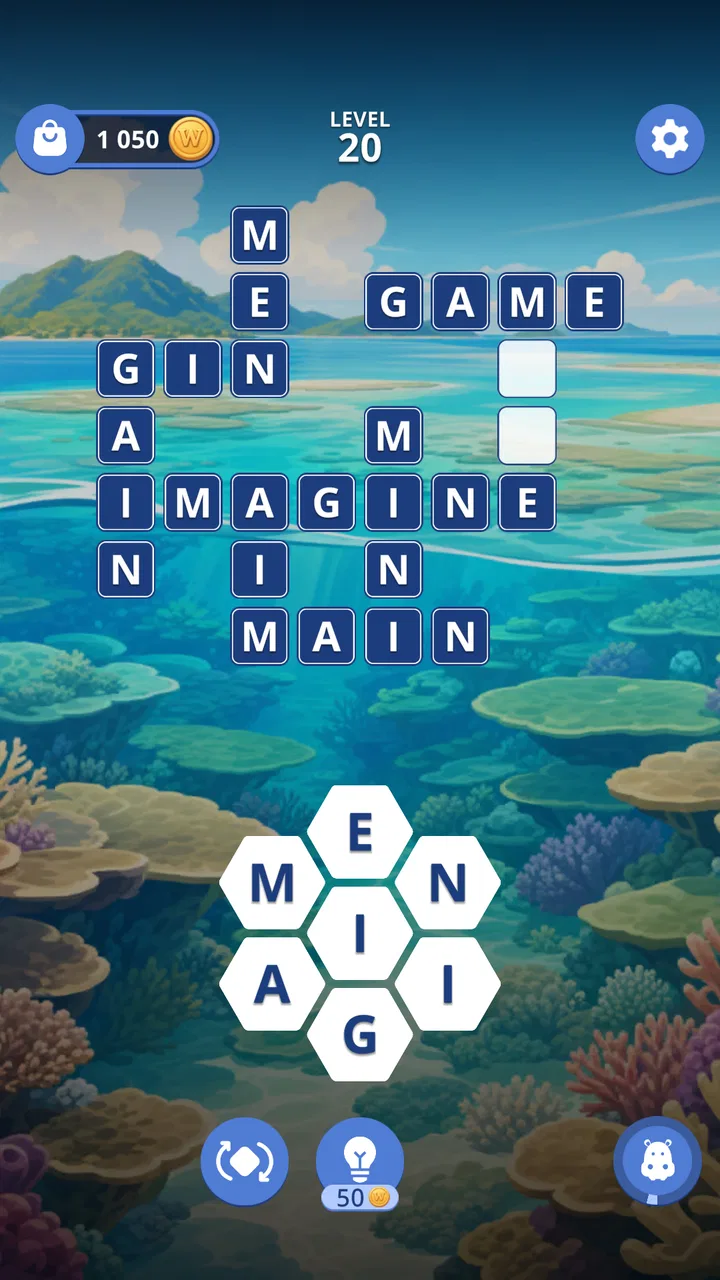
I approached Words of Wonders: Hexa as a word-game player who often switches between short sessions and longer, more focused puzzles. The basic idea is easy to understand: build words from a hexagonal letter layout, then use those words to progress through crossword-style challenges. That shape gives the familiar word puzzle format a slightly different rhythm, because the letters do not sit in a simple line or square grid.
What interested me most was not just whether I could find words, but how comfortably the game supported different ways of playing. A puzzle can be clever and still become tiring if the letters are hard to scan, the controls demand too much precision, or the screen becomes difficult to follow in a noisy place. My experience is that this game is at its best when I can give it a few quiet minutes and concentrate on the letter relationships rather than rush through them.
How the hexagonal layout affects readability and navigation
The hexagonal presentation is the defining part of the experience. Instead of moving through a conventional crossword grid, I look at a compact cluster of letters and search for possible combinations. That makes the first glance important. I tend to scan from the center outward, then check neighboring letters in groups rather than trying to read the board as one large word-search field.
You May Also Like

 Blood Strike: 2.5 Anniversary
Blood Strike’s Loadouts Turn Every Drop Into a Tactical Gamble
A close look at Blood Strike’s custom loadouts: how fast access to signature weapons reshapes its battle royale rhythm, rewards preparation, and narrows the gap between fights.

 Pandora - Music & Podcasts
Pandora’s Music Is Easy to Start, but Harder to Recover
Pandora’s strength is its low-effort path from a seed to a station. Its weak spot is how much confidence it asks you to place in connection, setup, and quiet recovery.

 8 Ball Pool
 Is Built on Rivalries, Rematches, and Routine
A close look at the rivalries, rematches, shared routines, and unanswered safety questions that turn a quick pool match into a persistent mobile community.

 Samsung Music
’s Quiet Strength Is Playing What You Already Own
Its reach comes less from spectacle than from dependable access to a personal library. That simplicity is both the app’s strongest retention engine and its ceiling.

 AccuWeather: Weather Radar
AccuWeather Review: A Quick, Clear Forecast for Everyday Decisions
For everyday plans, the best forecast is the one you can understand quickly. AccuWeather makes rain timing, radar, and local conditions easy to act on, with a few trade-offs.

 Hill Climb Racing
Why Hill Climb Racing Still Turns Crashes Into One More Run
A tiny car, a bumpy hill and one more upgrade: Hill Climb Racing keeps resurfacing because its simple chaos makes every near-miss feel personal.
More From Our News Desk
View All News


This is a useful distinction for anyone who normally plays standard crossword apps. Traditional crosswords usually provide familiar horizontal and vertical paths, while the hexagonal arrangement asks me to think more spatially. I cannot rely on the same visual shortcuts, so the opening puzzles feel more like learning a new reading pattern than simply answering clues.
Navigation is generally straightforward because the game keeps the main activity in front of me. I can focus on the current puzzle instead of moving through a complicated set of menus. That simplicity matters for players who prefer a low-distraction interface, and it also helps when I return after a break and want to continue without remembering a complicated route through the app.
At the same time, a clean layout does not automatically make every letter easy to distinguish. On a smaller phone, the distance between neighboring tiles can feel limited, particularly when I am tired or playing with the device held farther away. I found it more comfortable to pause and inspect the board than to drag quickly and hope I had selected the intended sequence.
A practical habit is to rotate my attention rather than my phone: first identify the most obvious short word, then use its letters as anchors for longer possibilities. This reduces the visual load because I am not repeatedly examining every tile from scratch. It is also a better strategy than randomly swiping around the board, which can turn a thoughtful puzzle into a frustrating guessing exercise.
The game is presented as a free word title from Fugo Games, and its store summary positions it as a distinct crossword experience. That description matches the feel of the board, but the important point for me is that the novelty comes from the arrangement, not from a completely unfamiliar goal. If you already enjoy forming words, the learning curve is manageable; if you dislike visual pattern changes, the hexagonal design may feel less natural than a classic crossword.
Reading comfort depends on the playing situation
I would not judge the interface only from a quick glance in a bright room. Letter games are especially sensitive to glare, distance, and fatigue. When reflections fall across the board, I spend more time confirming letters and less time solving. A shaded position or a modest increase in screen brightness can make a bigger difference here than changing my solving strategy.
The game can work well for players who prefer a calm pace, because the central task is visual and language-based rather than dependent on rapid reactions. That gives me time to inspect possible paths and reconsider a word. However, anyone who needs very large text, strong visual separation, or a highly adjustable display should test the app personally before making it a daily puzzle tool. I would not assume that a simple board automatically meets every reader’s needs.
Another useful approach is to use the phone at a stable distance instead of holding it close and moving it constantly. The hexagonal board rewards a steady view. I also find it easier to play with one clear source of light beside me rather than with a bright lamp directly behind the screen, since the latter creates distracting reflections on the letter tiles.
Motor and sensory considerations during play
The main physical action is selecting letters in sequence, so the experience is less demanding than a game built around repeated tapping, fast timing, or complicated gestures. For me, that makes it suitable for relaxed play with one hand when the phone is secure, although I prefer using both hands for longer sessions so I can support the device and avoid accidental movement.
Precision still matters. A player with reduced finger control may find rapid letter selection uncomfortable, especially when several tiles sit close together. My best workaround is to slow down and treat each word as a deliberate path. That approach also improves accuracy, because a rushed gesture can produce a different sequence from the one I intended.
This is one of the less obvious trade-offs of the format: the board is visually compact, which keeps the puzzle focused, but compact tiles can increase the need for careful touch placement. Players who enjoy fast swiping may appreciate the feeling of momentum, while players who need more time between selections may prefer a deliberate rhythm. I would choose the latter whenever accuracy matters more than speed.
Sensory comfort is similarly personal. A word puzzle offers less visual motion than an action game, which can make it easier to tolerate for people who avoid busy animated screens. Still, the board remains a concentrated visual task. If I have a headache or feel mentally tired, I notice that the challenge comes from maintaining attention across the letter cluster rather than from any physical action.
Sound is not central to the reason I play this title. I can approach it as a quiet activity, which suits public spaces and shared rooms. That makes it useful when I want something interactive without committing to a game that demands audio cues. I would still keep the phone at a comfortable brightness and take breaks, because a quiet game can remain visually tiring when I stare at a small screen for too long.
For players who use a stylus, the usefulness will depend on how naturally the selection gesture works with that accessory. I would not buy a stylus specifically for this game, but someone who already uses one may find it helpful for more precise tile selection. The safer expectation is that careful finger input remains the normal way to play, rather than assuming the app is designed around alternative input devices.
Why the word format can support different levels of energy
One strength of this kind of puzzle is that my mental energy can change without making the app useless. When I am fresh, I can look for less obvious combinations and try to complete a board efficiently. When I am tired, I can focus on one cluster of letters at a time and treat the game as a slower concentration exercise.
That flexibility is valuable in everyday use. I can play while waiting for an appointment, during a quiet break, or at home when I want a screen activity that does not require a long narrative commitment. A typical session for me begins with a quick attempt at the obvious words, followed by a slower review of unused letters. The second pass is where the hexagonal layout becomes more interesting, because relationships between neighboring letters start to stand out.
There is also a language-related consideration. Players who are comfortable with the vocabulary expected by the game will get more from it than people who find word recall difficult in the app’s language. The challenge is not only visual; it is also linguistic. That can be satisfying for vocabulary practice, but it may be discouraging for someone looking for a purely pattern-based puzzle with minimal dependence on word knowledge.
Using it in real situations
I think the strongest everyday scenario is a short waiting period in a reasonably quiet place. If I have a few minutes before transport or an appointment, I can open the game, solve what I can, and stop without needing to remember a complex control system. The compact format makes that more practical than a long-form game that only feels worthwhile after a substantial session.
It can also suit shared environments where sound would be inconvenient. A word puzzle does not require me to follow spoken instructions or react to audio signals, so I can keep the phone quiet and concentrate visually. That does not make it ideal in every public setting: crowded movement, poor lighting, and constant interruptions all make the letter board harder to read.
For commuting, I would separate seated travel from standing travel. When seated, I can keep the phone stable and inspect the board. When standing or moving, precise selection becomes less comfortable, and a sudden jolt can interrupt a word. In that situation, I would choose a simpler activity or wait until I have a steadier grip rather than blame the puzzle for a problem caused by the environment.
The game is free to start, which lowers the barrier for trying the format. It includes in-app purchase items ranging from ninety-nine cents to forty-nine dollars and ninety-nine cents, so I would pay attention to the purchase flow and avoid treating optional spending as part of the basic cost. Anyone setting up a device for a child or for a player who wants strict spending limits should configure those safeguards before handing over the phone.
The Everyone content rating makes the game broadly approachable from an age perspective. That does not mean every child will find it easy: vocabulary, reading confidence, and fine touch control still shape the experience. I could see it working as a casual family word activity, but I would play alongside a younger user rather than assume the rating guarantees independent accessibility.
How it compares with familiar word-game alternatives
Compared with a standard crossword app, this game feels less dependent on clue-reading and more dependent on discovering word paths from the available letters. That can be a welcome change if clues usually slow me down. On the other hand, players who enjoy the satisfaction of filling a clearly numbered grid may miss the structure and certainty of a conventional crossword.
Compared with a word-search game, the experience is more constructive than purely observational. I am not simply locating words hidden in a block of letters; I am building them through connected selections. That gives each board a more active decision-making feel, but it also means I cannot rely on scanning for a familiar word shape in the same way.
Compared with competitive word games, the hexagonal format feels more private and self-paced. I do not choose it when I want a social contest, rapid rounds, or pressure from another player. I choose it when I want to work through language at my own speed. That distinction is important because the game’s appeal is concentration, not competition.
There is a further trade-off against paper puzzles. Paper crosswords are easy to annotate and can be played without battery concerns, while this app is more convenient when I want automatic interaction and a portable board. The phone version is less flexible for people who like writing notes around a puzzle, but it is cleaner for someone who prefers tapping through a focused digital layout.
Remaining barriers and who should think twice
The biggest barrier is the combination of small-screen reading and precise selection. If I regularly struggle to distinguish nearby letters on a phone, the hexagonal arrangement may amplify that issue. A tablet-sized screen could be more comfortable in theory, but I would not assume the experience scales perfectly without trying the actual device.
Another barrier is vocabulary frustration. The game rewards familiarity with possible word combinations, so a player may understand the controls and still feel blocked by the language challenge. That is not a flaw for a word-game audience, but it does make the title a poor choice for someone seeking a relaxing puzzle with almost no reading demand.
I would also skip it if my priority were extensive accessibility customization. The straightforward presentation is helpful, but simplicity is not the same as a complete set of adjustments for every visual, motor, or sensory preference. Players who need a very specific interface should check the game directly on their own device before committing time or money.
Purchase options are another reason to be mindful. The game costs nothing to begin, but optional items can create a different experience for users who are sensitive to spending prompts. I prefer to decide in advance whether I am willing to make purchases, then keep that decision separate from the enjoyment of solving the puzzles. That keeps the free starting point from becoming an unplanned expense.
Finally, the game is not ideal when I need a completely hands-free activity. I have to look at the board and select letters, so it cannot replace an audio-first pastime. It is also a weak choice for moments when I am walking, driving, or handling something else. The interface may be simple, but the task still deserves attention.
My inclusive verdict after using the game
My overall impression is that this is a thoughtful option for players who enjoy word formation but want a break from ordinary crossword grids. The hexagonal layout gives the familiar category a distinct identity, and the low-pressure format makes it easy to fit into a short break or a quiet evening. Fugo Games has kept the central idea approachable enough for casual players while leaving room for people who like to examine letter relationships carefully.
The accessibility picture is mixed in a realistic way. The game’s focused board, quiet style, and non-reaction-based word solving can suit many players, including those who prefer slower sessions or limited sensory stimulation. Yet close tile spacing, visual concentration, and the need for accurate touch input may create friction for people with particular sight, motor, or fatigue-related needs.
It is currently listed as version 1.1.2 and supports devices running Android 8.0 or later, which makes checking device compatibility part of the sensible setup process. The game has an average rating of 4.9 from around 2.2 thousand ratings and has passed 50 thousand installs, signs that the concept has found an interested audience without telling me that it will suit every playing style.
I would recommend it to someone who likes vocabulary puzzles, wants a self-paced alternative to classic crosswords, and is comfortable reading a compact board. I would suggest trying it cautiously if screen readability or touch precision is a concern, and I would choose a conventional crossword, paper puzzle, or audio-friendly activity when those formats better match the player’s needs.
For me, the deciding factor is the balance between novelty and familiarity. The goal remains easy to grasp, but the hexagonal structure makes me slow down and look at words differently. It is most rewarding when I treat it as a focused visual word exercise, not as a fast game. With that expectation, the free entry point makes it worth exploring, while the known limitations make it easier to decide whether it belongs in my regular puzzle rotation.
FAQs for Words of Wonders: Hexa
01What is Words of Wonders: Hexa?
Words of Wonders: Hexa is a word puzzle game that combines crossword-style challenges with a hexagonal letter layout. You connect adjacent letters to form words and complete the puzzle shown on the board. The game is designed for short sessions, but later levels become more demanding as the number of possible combinations increases and the available hints become more important.
02How do you play Words of Wonders: Hexa?
Each level provides a group of letters arranged around or within a hexagonal puzzle structure. Your goal is to swipe across neighboring letters and create valid words that fit into the empty spaces. Some solutions are required to finish the level, while additional words may be accepted as bonus discoveries. Progress generally depends on finding the correct combinations rather than simply guessing randomly.
03Is Words of Wonders: Hexa free to download and play?
Words of Wonders: Hexa can generally be downloaded and played without an upfront purchase, making it accessible to casual players. However, free-to-play games commonly include optional in-app purchases, such as extra hints, coins, or other helpful resources. Depending on the version and device, advertising may also appear between levels or during gameplay, so users should review the store listing before downloading.
04Does Words of Wonders: Hexa require an internet connection?
The game may allow some puzzle content to be played offline, which is useful when traveling or when a reliable connection is unavailable. Nevertheless, certain features can depend on internet access, including advertisements, purchases, synchronization, updates, or online events. Because offline availability may vary by platform and game version, it is best to test the specific features you need after installation.
05Is Words of Wonders: Hexa suitable for children and beginners?
Words of Wonders: Hexa is relatively easy to understand because its main mechanic is based on forming words from a limited set of letters. It can be suitable for beginners and may help players practice spelling and vocabulary in an entertaining format. Difficulty increases over time, however, and younger users should be aware of advertisements, optional purchases, and any privacy or parental-control settings available on their device.
Pros
- Hexagonal boards offer a fresh twist on familiar word-search gameplay.
- Hundreds of levels provide plenty of content for short or long sessions.
- Simple controls make it easy to play with one hand.
- Offline play is useful when traveling or using limited mobile data.
- Progression through landmarks adds a light sense of discovery.
Cons
- Some later puzzles may feel repetitive after extended play.
- Hints can become scarce
- encouraging optional purchases or ad views.
- Ad interruptions may affect the flow between completed levels.
- A few solutions rely on less familiar words or unusual spellings.
- The small hexagonal layout can be tiring to scan on smaller screens.

Words of Wonders: Hexa
Gallery